
Repertoire of Myriad Melodies Trainer


Play online: qianyin.fun
Qianyin Xipu is a “Practice Mode” made for Genshin Impact’s Repertoire of Myriad Melodies, aiming to provide players with a professional score-practice tool.


- Seeking: Drag the timeline or use the arrow keys or mobile buttons to seek by ten seconds. Mobile controls can also set A and B from the current position; seeking restarts scoring from that position.
- Practice settings: Adjust playback rate, practice audio volume, note scroll speed, hit window, timing offset, and key sound volume. Manual presses play a synthesized pluck; set the volume to zero to mute it.
- Practice feedback: See live completion, hits, combo, misses, and early or late timing, then review each finished attempt. Personal bests are saved in the current browser separately for each chart version, section, and set of practice settings.
- Local charts: Try an original sample chart or import your own JSON chart and matching audio.
- Section looping: Select an A–B section and optionally repeat it with a short lead-in before each attempt. Looping is off by default.
This project is non-profit. It is not a cheat or an auto-playing tool—purely out of love.
This is an unofficial fan project and is not affiliated with miHoYo, HoYoverse, or Genshin Impact.
Node.js 20.19+, 22.13+, or 24+ is required. The site has no third-party runtime dependencies. Install the development tools and start the site:
npm ci
npm start
Run lint, tests, and the coverage report:
npm run lint
npm test
npm run test:coverage
Coverage includes frontend files that the tests do not load. The detailed report is at coverage/lcov-report/index.html; browser end-to-end tests are not included yet.
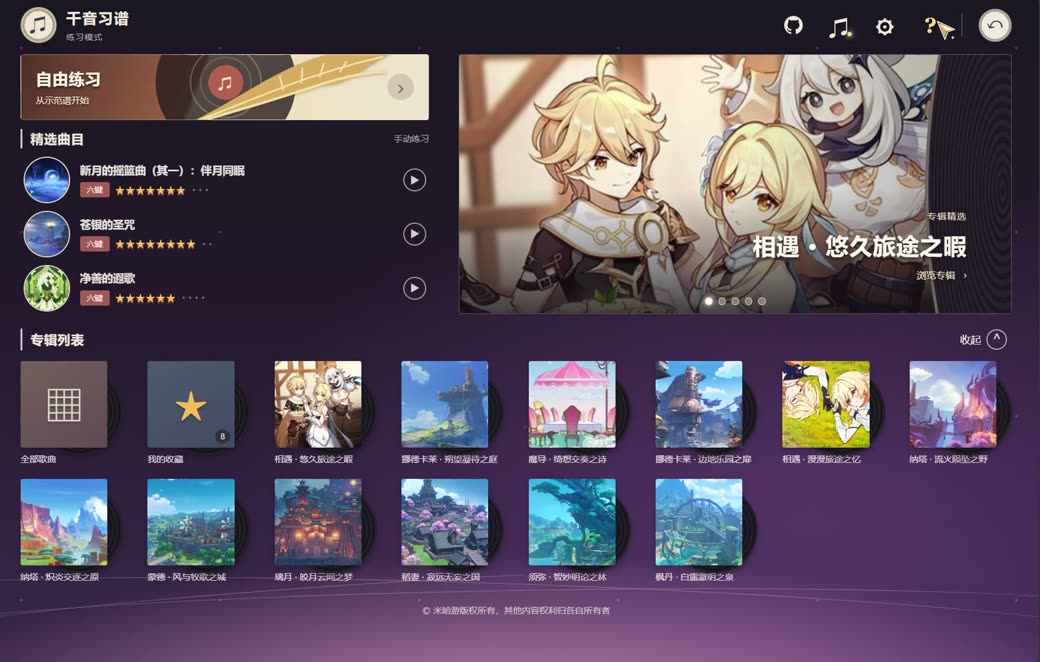
Default keys: A, S, D, J, K, L. Press Space to pause or resume. Open “Charts & Settings” at the top right to import files and adjust the practice section or key bindings. Choose a language under “语言 / Language” in settings. On the home screen, browse albums, open favorites, and adjust practice settings; select the star below a song's details to add it to your favorites.
The production site is served as static files by Cloudflare Pages; DNS and TLS are handled by the Cloudflare Zone for the same domain.
| Setting | Value |
|---|---|
| Build command | npm run build |
| Build output directory | build |
npm run build copies dist/ into build/, adds _headers and 404.html from deploy/, and generates a version from the scripts, styles, song catalog, and charts. The version keeps cached pages, code, catalog data, and charts in sync.
After adding or replacing cover artwork, run node scripts/generate-cover-thumbnails.mjs with ImageMagick installed and commit the generated previews. Deployments use the checked-in previews and do not require ImageMagick.
Pushes to main are built and published automatically; qianyin.pages.dev stays available as well.
GitHub Actions runs lint, tests, and a build on Node.js 20, 22, and 24 for pushes and pull requests, and produces coverage on Node.js 24. These checks run independently of Cloudflare's automatic deployment and do not by themselves block publication from main.
The trial charts are converted from the public score repository; only Legendary difficulty is currently available. Structural checks do not establish note-by-note parity with the game. Variable-tempo charts and synchronization still need verification. Some cover images are sourced from the Genshin Impact Wiki and a public album art gallery; songs without an identified cover use a placeholder. The 22 unavailable songs show their status in the library; songs with an identified official soundtrack can be previewed separately. Some songs use their soundtrack album art as a labeled substitute.
Open “Charts & Settings” and choose “Surasthana Fantasia · Legendary” to load the six-lane chart with 231 notes at 168 BPM. The chart is adapted from the public score database and contains taps and holds.
The default source for Surasthana Fantasia is its NetEase Cloud Music recording. NetEase sources are matched for 125 playable songs; use the accompaniment controls to choose YouTube, a metronome, or a local file instead. The app first uses the third-party Qingyu Meting API for personal sites to obtain an HTTPS stream, then tries the site's resolver and NetEase's direct link, YouTube, and the metronome as needed. Short previews are rejected for practice. Availability depends on the platform, third-party service, network, and region. The project does not bundle song recordings.
The album version is longer than the 1:35 in-game edit, and their full alignment has not been verified. You can adjust the audio start offset, but this does not guarantee synchronization throughout the song. Songs without a matched online source still offer a metronome or a user-provided local file. When you save local audio for a song, its start point is also saved in the current browser.
Song, soundtrack, and game-content rights remain with their respective owners; the project's MIT license does not grant rights to third-party content.
The default hit window is ±180 ms and can be adjusted from ±120 to ±240 ms in the settings. The precise window remains ±55 ms, and holds can be released within the same window before their end. Inputs outside the window receive feedback without adding an extra miss. Changing the window restarts the current section, and the setting is stored locally.
Completion is measured against the maximum possible score in the selected A–B section. In this trainer's provisional model, a precise tap or hold head earns 20 points and a good one earns 10; a held note earns 5 points per beat while held. Early release keeps already earned points. Charts without BPM use 120 BPM. Completion is separate from playback progress and resets on each loop. The scoring model has not been calibrated against the game.
Charts use UTF-8 JSON. Set laneCount to 4 or 6; lanes are numbered from 0 to laneCount - 1, and times are in milliseconds. Four-key charts default to A, S, K, L; six-key charts use A, S, D, J, K, L. Each layout keeps its own key bindings. Import a chart and select matching audio; try the original four-key sample.
{
  "version": 1,
  "title": "Practice section",
  "artist": "Chart author",
  "durationMs": 12000,
  "bpm": 120,
  "laneCount": 6,
  "notes": [
    { "atMs": 2000, "lane": 0, "holdMs": 0 },
    { "atMs": 2500, "lane": 3, "holdMs": 1000 }
  ]
}
This is an early prototype. Its sample chart and metronome are original; judgement has not yet been calibrated against the game. No song audio is bundled, and in-game sharing codes cannot be imported.