
AI Dialogue service supporting a wide range of large language models for chat, multi-turn conversations, streaming responses, and image recognition.


API home page: Ace Data Cloud - AI Chat
Keywords: aichat-api, ai-dialogue, chat-api, multi-turn-conversation, gpt-4, grok, streaming, rest-api, ai-api, developer-tools, AI API, REST API, Developer API, Ace Data Cloud
- Open Ace Data Cloud → Applications. Sign in, or register an account first.
- Find General application. If it has not been created, choose Initialize General Application. A general key can use the services available to your account; a dedicated application's key is limited to its service. Check the required service/model access and current pricing.
- Copy the API Key from the application card, or open Keys / Manage Keys → Create to create a separate key for this integration. Give it a recognizable name so you can revoke or rotate it independently.
- When creating a key, review Expiration Time, Set Usage Limitation, and Allowed APIs. Enable only the restrictions you need, allow the operations you will call, then click Create and copy the token from the key list. Task lookup does not grant permission to submit a generation. Confirm the application's balance can cover your first request; any trial allowance is whatever your account currently displays.
- Copy only the token value, without quotation marks, spaces, or
Bearer. An API Key / API Token field expects this raw value; only a manually configured HTTPAuthorizationheader needs theBearerprefix. Aplatform-...account-management token cannot replace a generation API key.
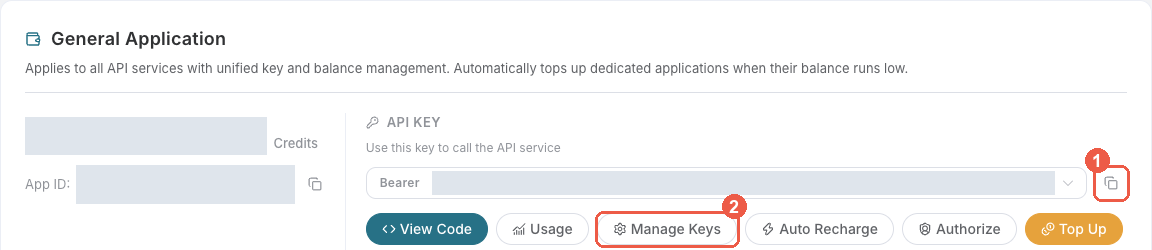
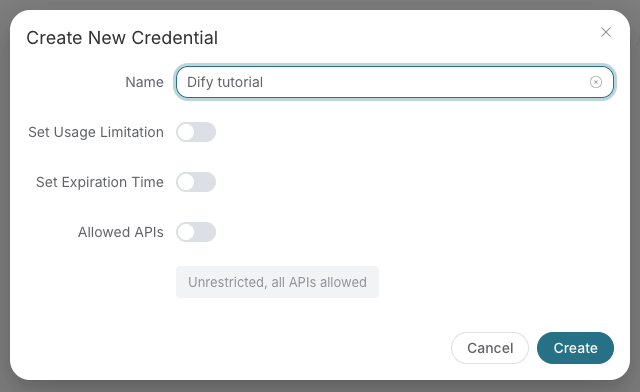
Save the key in the client's credential store or the environment variable shown below. Never put it in a prompt, shared workflow, screenshot, or Git commit. If authentication fails, check the full copied value, application/service access, expiration, usage limit, and balance before creating another key.
- Unified developer platform with one API key, billing system, and usage tracking
- Production-ready AI API endpoints served from https://api.acedata.cloud
- English integration guides, API references, and service documentation
- Global-ready workflow for developers building chat, image, video, music, and search products
The AI Chat Conversations API enables you to send a question to a large language model and receive an answer. It supports a broad range of models (GPT-6, GPT-4o, Grok, Gemini, GLM, Kimi, and more), multi-turn stateful conversations, streaming responses, model presets, and image recognition via reference URLs — all without needing to manage message history or token limits yourself.
To use the AI Chat API, apply for the corresponding service on the AI Chat API page. After entering the page, click the "Acquire" button.
There is a free quota available for first-time applicants, allowing you to use this API for free.
- Base URL: https://api.acedata.cloud
- Service page: AI Chat on Ace Data Cloud
- Docs: Developer documentation
curl --request POST "https://api.acedata.cloud/aichat/conversations" \
  --header "Authorization: Bearer YOUR_API_KEY" \
  --header "Content-Type: application/json" \
  --data '{
    "model": "gpt-4o",
    "question": "What is the capital of France?"
}'Explore the supported endpoints and integration guides for AI Chat.
| API | Path | Integration Guidance |
|---|---|---|
| AI Chat Conversations API | /aichat/conversations |
AI Chat Conversations API Integration Guide |
AI Chat v2 supports agent tool calls. Its model field supports kimi-k3.1-pro, with kimi-k3 still available. This is the v2 model list, not the separate /aichat/conversations model list documented above.
The following limits apply to v2, not the /aichat/conversations endpoint documented above.
| Endpoint | Optional field | Range | Default when omitted |
|---|---|---|---|
POST /aichat2/conversations |
max_turns |
1–500 | 500 |
POST /aichat2/scheduled-tasks |
template.max_turns |
1–500 | 500 |
Setting max_turns to 1 requests a single answer without tool calls. For scheduled tasks, template.max_turns limits agent turns per run, not scheduling frequency. Each model call is still billed for actual usage; 500 is an upper bound, and a run may end earlier due to timeout, authorization, or other execution conditions.
Repeated AI execution failures do not automatically pause a scheduled task: it will try again at the next scheduled time. Automatic pausing occurs after five consecutive failures to hand the task to the execution service. Insufficient balance marks a run as failed and triggers a recharge notification. An enabled task does not mean its latest run succeeded; check run history with action: "retrieve_runs" on POST /aichat2/scheduled-tasks for execution results.
Use POST /aichat2/scheduled-tasks for these v2 controls, not /aichat/conversations.
| Field | Behavior |
|---|---|
jitter_seconds |
Nonnegative integer seconds; defaults to 60. Cloud runs get an independent random offset before or after their planned time; 0 disables it. For interval schedules, the range is capped at one quarter of interval_seconds. Local runs have no jitter. |
trigger_probability |
Number from 0 to 1, default 1. Each account independently decides whether to start at each trigger: 0 always skips, 1 always starts, and 0.5 starts about half the attempts over time, not necessarily half the accounts each round. Applies to cloud, local, and immediate runs, independently of jitter. |
unattended_policy.connection_bindings |
Cloud tasks can select multiple accounts for one connector, with one account each for other connectors, up to 100 bindings total. Local execution still permits only one account per connector. |
For example, update an existing task with your installed skill and connected account IDs:
{
  "action": "update",
  "id": "YOUR_TASK_ID",
  "jitter_seconds": 600,
  "trigger_probability": 0.5,
  "unattended_policy": {
    "allowed_skills": ["your-installed-skill"],
    "connection_bindings": [
      {"connector_identifier": "github/github", "connection_id": "account-one"},
      {"connector_identifier": "github/github", "connection_id": "account-two"}
    ]
  }
}
Each selected cloud account has its own schedule, conversation, authorization check, billing, and run result. One account's failure does not block the others. With jitter disabled, runs share a planned time but are processed sequentially, not guaranteed to start simultaneously. The task list retains one configuration and shows the account count and earliest next trigger.
Probability is sampled before conversation creation, model calls, and model charges. A skipped attempt records status: "skipped" and error_code: "probability_skipped", does not pause the task, and incurs no model charge. Duplicate callbacks reuse the saved decision rather than sampling again.
Immediate runs evaluate probability independently for every selected account. The API returns a runs array with run_id and status (plus conversation_id for started runs), and triggered_count / skipped_count. Compatibility fields refer to the first started run; when all attempts skip, there is no conversation_id.
Changing account selection reschedules the next execution; editing the prompt or probability does not. Pause, resume, and delete affect all accounts, while already-started runs may finish. Existing single-account tasks retain their settings; multi-account selection does not merge copied tasks, so pause redundant copies to avoid duplicate runs. In run history, run_accounts snapshots only the accounts selected for that run; later binding changes do not rewrite it.
On POST /aichat2/scheduled-tasks, use action: "retrieve_batch" to list the current user's tasks, newest first. Optional search matches task-name substrings, ignoring English case and surrounding whitespace; it is not a regular expression. Omit it or send an empty string for all tasks. Search runs before pagination across the user's complete task list.
Request body example (use the same authenticated request setup as above):
{"action": "retrieve_batch", "search": "daily", "offset": 0, "limit": 10}offset defaults to 0; limit defaults to 100 and must be 1–100. Read the current page from items and the total matching count from count. Increase offset by limit, keeping search unchanged, until the accumulated results reach count.
- Ace Data Cloud Developer Platform
- Ace Data Cloud Docs
- Status Page
- Ace Data Cloud GitHub Organization
If you meet any issue, please check support info or browse the latest documentation on docs.acedata.cloud
mimo-v2.6-pro and mimo-v2.6-flash support text chat, reasoning and function tools. Consult the console for service status and account access. The dedicated contract is POST /mimo/chat/completions, with the permitted /v1/chat/completions alias. AiChat v2 uses its own conversation payload and the mimo model group.
See the MiMo integration guide for request shape and billing semantics.